Tuesday, August 15, 2017

Hide Query By Example of PanelCollection on page load

Hi All,

If there is a table with filterable is true. If you want to display QueryByExample then surround this table with panelCollection. Then Automatically QBE will be displayed in open mode(with filters are visible). If you need to hide the default open qbe then just make the table filterable property to false.


If you dont want to show the complete QBE it self then panelCollection dont have any property. We can achieve this by using skinning.

af|panelCollection.customPanelCollection div[id$='_qbeTbr'] {
    display: none;
}

with this we can hide QBE.


Generic method to execute a procedure in ADF Applications

In most of the ADF applications we have a requirement to execute a procedure from manged bean adn get the result. For this we need to follow the following steps.

Step1. Create a method in Application Module Impl class. like executeProcedure(......)


    public HashMap CallProcedure(String procedureName, int noOfIPParameters, int noOfOPParameters,
                                      ArrayList inputValues) {
        HashMap<Integer,Object> hm = new HashMap<Integer,Object>();    
        CallableStatement cst = null;      
        try {
            String proc = "begin ";
            if (noOfIPParameters > 0) {
                proc = proc + procedureName + "(";
                int totalParams = noOfIPParameters + noOfOPParameters;
                for (int params = 1; params <= totalParams; params++) {
                    if (params == totalParams) {
                        proc = proc + "?";
                    } else {
                        proc = proc + "?,";
                    }
                }


            }else if(noOfIPParameters==0){
                proc = proc + procedureName + "(";
                int totalParams =  noOfOPParameters;
                for (int params = 1; params <= totalParams; params++) {                  
                    if (params == totalParams) {
                        proc = proc + "?";
                    } else {
                        proc = proc + "?,";
                    }
                }
            }
           
           
            else {
                proc = proc + procedureName;
            }
            proc = proc + ")";
            proc = proc + "; end;";
            System.out.println("proc::::" + proc);
            cst = getDBTransaction().createCallableStatement(proc, 0);

            if (noOfOPParameters > 0) {
                int outputStartVar = noOfIPParameters + 1;

                for (int outputParam = outputStartVar; outputParam <= (noOfIPParameters + noOfOPParameters);
                     outputParam++) {
                 
                    cst.registerOutParameter(outputParam, Types.VARCHAR);
                }

            }

            if (noOfIPParameters > 0) {

                for (int inputParam = 1; inputParam <= noOfIPParameters; inputParam++) {
                 
                    int tempVar = inputParam - 1;
                    cst.setObject(inputParam, inputValues.get(tempVar));
                }
            }


            //            cst.registerOutParameter(2, Types.INTEGER);
            //            cst.registerOutParameter(3, Types.VARCHAR);
            //            cst.setInt(1, 2);
            cst.execute();
         
           // System.out.println(".............2.:::" + cst.getObject(2));
           
            if(noOfOPParameters > 0){
                int outputStartVar = noOfIPParameters + 1;
                for (int outputParam = outputStartVar; outputParam <= (noOfIPParameters + noOfOPParameters);
                     outputParam++) {
                 
                   hm.put(outputParam, cst.getObject(outputParam));
                }
               
            }
           

            //Finally get returned value
            return hm;
        } catch (SQLException e) {
            System.out.println("error::" + e.getMessage());
        } finally {
            if (cst != null) {
                try {
                    cst.close();
                } catch (SQLException e) {
                    e.printStackTrace();
                }
            }
        }

        return hm;

    }

Step2. Expose this method to the client interface.

For this go to java tab of application module  and add in client interface like this.


Step3. Add this method as Method Action on page bindings.


Step4. By using get Operation Binding get the method action.

  OperationBinding operationBinding = bindings.getOperationBinding("CallProcedure");

Step5. Execute this operation Binding and get the result.
  String procedureName = "Procrdure_Package_Name.Procedure_Name";
if input parameters 0 and out parameters 1 then. ArrayList inputValues = new ArrayList();

if input paramets 2 and out parameters 2 then ArrayList inputValues = new ArrayList();
inputValues.add("in parameter1");
inputValues.add("in parameter2");

                operationBinding.getParamsMap().put("procedureName", procedureName);
                operationBinding.getParamsMap().put("noOfIPParameters", 0);
                operationBinding.getParamsMap().put("noOfOPParameters", 1);
                operationBinding.getParamsMap().put("inputValues", inputValues);
                operationBinding.execute();
              Object  result = operationBinding.getResult();
if(result!=null){
HashMap returnValues = (HashMap) result;
}


Step6. Process the result(like to store in table or to set to some view attribute).

Generic method implementation in Application Module Impl.


Redirect to a page in ADF 12C

There were couple of situations to redirect to a page in adf applications like from adf filter we need to redirect or on button click we need to redirect . Frank has posted a blog post in which he has mentioned how efficiently we can redirect to page. But the solution is working only in weblogic but not in glassfish.
You can find Frank's post here.
https://blogs.oracle.com/jdeveloperpm/how-to-efficiently-redirect-to-an-adf-faces-view-using-adf-controller


Case1. Redirect to a page from ADF Filter.

By using the request dispatcher we can redirect by using the following piece of code.

    @Override
    public void doFilter(ServletRequest servletRequest, ServletResponse servletResponse,
                         FilterChain filterChain) throws IOException, ServletException {
        HttpServletRequest req = (HttpServletRequest) servletRequest;
           HttpServletResponse res = (HttpServletResponse) servletResponse;
if(username==null){
 ((HttpServletRequest)req).getRequestDispatcher("/faces/Pages/Login.jspx").forward(req, res);
}
}

Case2. Redirect to page on button click.

By using the ExtendedRenderKitService we can redirect to a page on button click.

 String serverPath ="http://"+request.getServerName()+":"+request.getServerPort()+"/ApplicationName/faces/Pages/Home.jspx";

                String url = "window.open('"+serverPath+"','_self');";
                erks.addScript(FacesContext.getCurrentInstance(), url);

It will redirect to the page specified.


Monday, May 8, 2017

Could not commit when auto commit set on ADF Glassfish Server

Hi All,

In our recent project we have faced one strange issue that is when we try to commit the data using Application Module commit operation Its throwing could not commit when auto commit set on. The same is working fine in Weblogic. We have deployed the same application in glassfish server but suddenly this popup is getting launched.


The solution for this issue is just server configuration change. Open JDBC in glassfish console and set Non-Transactional connections as checked. Thats it the problem will be resolved. 


Set Non-Transactional Connections >> true.

Happy Learning....

Dotted lines on PanelBox or Buttons or Links in ADF

Hi All,

In our recent project we faced the skinning issue especially in Chrome Browser. We have a panelbox which contains links. When we click on any link rectangular box is coming like this.


Solution is very straight forward just need to add this single line for all the components for which box is coming.

i.e, outline: none;

Now if you add this line you will not get any dotted lines.

Thursday, September 1, 2016

After Commit extra empty rows are getting created


Recently In our project we came to a strange  situation where if user is creating new rows and committing the data to database. After commit operation its creating empty rows (count is equal to newly created rows).

Its because of one Entity instance data has been shared by multiple VO instancces.

This is a strange behavior of ADF VO. the reason behind this behavior is data shared between VO instances like if there were multiple instances of the same VO i.e, iterators data shared between those iterators.

the solution is straight forward, like it can be done at 2 levels. Like 1. Application Module Level

2. VO Impl class Level.

1. Application Module:

If we want to apply this at all view objects of the application. Then we can go for this option.

In application module we have a property jbo.viewlink. consistent . the default vlaue is true (DEFAULT) we need to change this property to false as shown in below image. B


2. VO Impl class Level:

In VO Impl we need to override the rowQualifies life cycle method. To display the rows which are not modified.

    @Override
    protected boolean rowQualifies(ViewRowImpl viewRowImpl){
        EntityImpl primaryEntity = viewRowImpl.getEntity(0);
        if(primaryEntity !=null && primaryEntity.getEntityState()!=Entity.STATUS_UNMODIFIED){
            return false;
        }
        return super.rowQualifies(viewRowImpl);
    }


that's it Its working simple tip but saved lot of time. It might be helpful to you.

Thursday, December 17, 2015

varStatus variable in ADF table

There is an inbuilt feature in ADF table called varStatus variable, which can be used to display a auto increment number for any dummy column in adf page.

Suppose if there is a requirement to display serial numbers in adf page for each row, we can create a column name and use the varStatus attributes index method to achieve this.

Step1: In af:table source add the variable varStatus like this.

<af:table value="#{bindings.DepartmentsView1.collectionModel}" var="row"                         
                         varStatus = "vs" >

Step2: add a dummy column Serial Number to the table like this.

<af:column id="c5" headerText="Serial Number"/>

Step3: add output text component in the above column like this. and Make the value attribute to the vs.index+1. first vs.index will have value 0 . So from there we are increment by 1.

<af:column id="c5" headerText="Serial Number">
 <af:outputText value="#{vs.index+1}" id="ot1" />
                    </af:column>

Step4: Run the page you will get the following output.


but if you want to access this varStatus value from a managed bean you wont access as the documentation says that the value will be lost once its rendering.

An alternate approach to get the value of varStatus is getting the row index. 

we can Get the row index  by following code

  1. RowKeySet selectedEmps = getTable().getSelectedRowKeys();  
  2.     Iterator selectedEmpIter = selectedEmps.iterator();  
  3.     DCBindingContainer bindings = (DCBindingContainer) BindingContext.getCurrent().getCurrentBindingsEntry();  
  4.     DCIteratorBinding empIter = bindings.findIteratorBinding("EmployeesView1Iterator");  
  5.     RowSetIterator empRSIter = empIter.getRowSetIterator();  
  6.     while (selectedEmpIter.hasNext())  
  7.     {  
  8.       Key key = (Key) ((List) selectedEmpIter.next()).get(0);  
  9.       Row currentRow = empRSIter.getRow(key);  
  10.       System.out.println("Row Index= " + (empIter.getViewObject().getRangeIndexOf(currentRow) + 1));  
  11.     }  

Cheers... keep learning... 


Thursday, November 12, 2015

Disable Full Page Refresh on Button Click in ADF

If in our application there is a command button on clicking on that command button the page is refreshing totally and loading the page.

If we dont want this full page refresh then we have to make a small change i.e. set partialSubmit to true for that command button. It will not refresh entire page.

Tuesday, July 22, 2014

Select Many Choice use in ADF

Hi All, if we want to select multiple values from the list box then we will make use of inbuilt component "af:selectmanychoicebox" in ADF. follow these steps to use this component.

Step1: Create view object for example I have created "DepartmentsVO"

Step2: make an attribute as lov from "DepartmentsVO"

Step3:  create one jspx page and add List binding in page definition as shown below


Step 4: from component pallete select "Select Many Choice component" and it will ask for bindings add bindings like below and click on ok


Step 5: Run the page you will get the output like this


Friday, July 18, 2014

Adding Validation to the Criteria in ADF

Hello Guys if you want to add validation to the input text fields of the Criteria please follow the steps.

Step1: Create a view Criteria as shown below

Step2:

Drop this named criteria from data controls to a page as Query Panel


Step3:

Drop the View Object as form on the same page

Step4: add Partial Target of the form to Criteria


Step5: Select af:Query Component in Structure window and change the query listner property from Property Inspector as shown below(Default query Listner value is: #{bindings.EmployeesEOViewCriteriaQuery.processQuery} ) save this value which needs to be used in bean class


Step6:

write the following code in the bean class:

package com.test.beans;

import com.mobile.model.TestAMImpl;

import javax.el.ELContext;
import javax.el.ExpressionFactory;
import javax.el.MethodExpression;

import javax.faces.application.FacesMessage;
import javax.faces.context.FacesContext;

import oracle.adf.model.BindingContext;
import oracle.adf.model.binding.DCDataControl;
import oracle.adf.model.binding.DCIteratorBinding;
import oracle.adf.view.rich.event.QueryEvent;

import oracle.binding.BindingContainer;

import oracle.jbo.ApplicationModule;
import oracle.jbo.server.ViewObjectImpl;

public class FormValidate1 {
    public FormValidate1() {
    }

    public void customQueryListner(QueryEvent queryEvent) {     // Add event code here...
       
       String fname = null;
        String lname = null;
        BindingContext ctx = BindingContext.getCurrent();
        BindingContainer cont = ctx.getCurrentBindingsEntry();
        DCIteratorBinding dci = (DCIteratorBinding) cont.get("EmployeesEOView1Iterator");
        ApplicationModule am  = dci.getDataControl().getApplicationModule();
        //ApplicationModule am  = dci.getDataControl().
//        cont.ge
       //  ApplicationModule am  = dci.geta
        DCDataControl dc = ctx.findDataControl("TestAMDataControl");
        TestAMImpl ta =(TestAMImpl) dc.getApplicationModule();
       
        ViewObjectImpl voi = (ViewObjectImpl)dci.getViewObject();
        fname = (String)voi.getNamedWhereClauseParam("bFirstName");
        lname = (String)voi.getNamedWhereClauseParam("bLastName");
        if(fname.length() >4) {
        FacesContext.getCurrentInstance().addMessage(null,new FacesMessage("Name should not be lessthan 4 charecters"));
        }
        else if(am.getTransaction().isDirty()) {
            FacesContext.getCurrentInstance().addMessage(null,new FacesMessage("Please Save the changes or Undo Them"));
        }
       
        else{
           
         String el = "#{bindings.EmployeesEOViewCriteriaQuery.processQuery}";
            invokeEL(el, new Class[]{QueryEvent.class}, new Object[]{queryEvent});
           // invokeEL(el, null,  new Object[]{queryEvent});
        }
       
       
    }
   
   
    public static Object invokeEL(String el,Class[] paramtypes, Object[] params) {
        FacesContext cont = FacesContext.getCurrentInstance();
        ELContext elcont =  cont.getELContext();
        ExpressionFactory ef = cont.getApplication().getExpressionFactory();
        MethodExpression exp = ef.createMethodExpression(elcont, el, Object.class, paramtypes);
        return exp.invoke(elcont, params);
    }
}

Step7:
Run the application and give charecters for firstname more than 4 you will get error message.


Wednesday, June 25, 2014

ADF Logging

Hi Guys today I am going to implement adf logging.

To create please follow the steps.

1. Create a java class and import "oracle.adf.share.logging.ADFLogger"

2. get the instance of Logger object.

public static ADFLogger logger = ADFLogger.createADFLogger(LoggerBean.class);\

3. write a java method and add some information to the logger object.

    public String logging() {
        logger.info("this is from logging bean");
        // Add event code here...
        return null;
    }

4. Create a jspx page and call this method from  the page by using action or what ever you want.


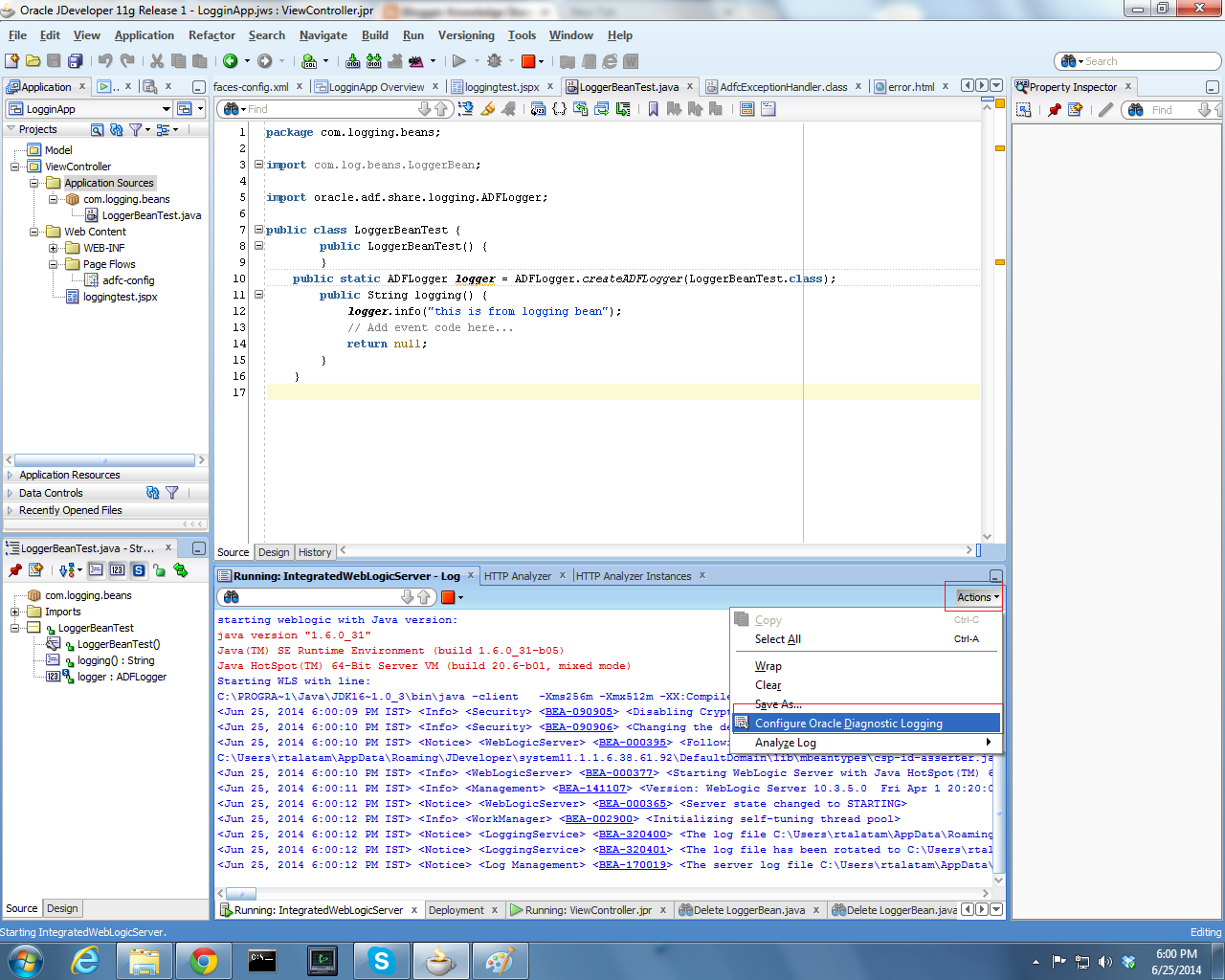
5. Logging Configuration in Oracle jDeveloper.

5.1. Keep the Server in running mode and go to the java class and select Actions from log window and select Configure Oracle Diagnostic Logging.


5.2 In Oracle Diagnostics Logging Configuration Click on + symbol and select Add Persistent Logger.

give the package name to which you want to give logging and click on OK


5.3. Go to Structure window and copy & paste one log_handler and change the name.


5.4. Goto Source Tab and change the file location i.e, path for this log_handler.

ex. <property name='path' value='${domain.home}/servers/${weblogic.Name}/logs/rajuOwn.log'/>

5.5 Go to Overview Tab and in Handler Declarations click on + Symbol. and select the log_handler (raju_hanlder) as we have created in the step 5.3.


6. Now run the jspx page and click on button you will get a file with the name "rajuOwn.log" at the location:

C:\Users\User Name\AppData\Roaming\JDeveloper\system11.1.1.6.38.61.92\DefaultDomain\servers\DefaultServer\logs

if you have any doubts feel free to reach me..

njy learning adf.


Hide Query By Example of PanelCollection on page load

Hi All, If there is a table with filterable is true. If you want to display QueryByExample then surround this table with panelCollection....